
Automate customer service with a digital support employee.
Automating customer service doesn’t mean letting AI answer every ticket unchecked. Often the better start is: read the request, look for context, create a draft answer, let people decide.
A digital support employee reduces research, FAQ handling, and preparation work without letting sensitive answers, edge cases, or customer data slip out of control.
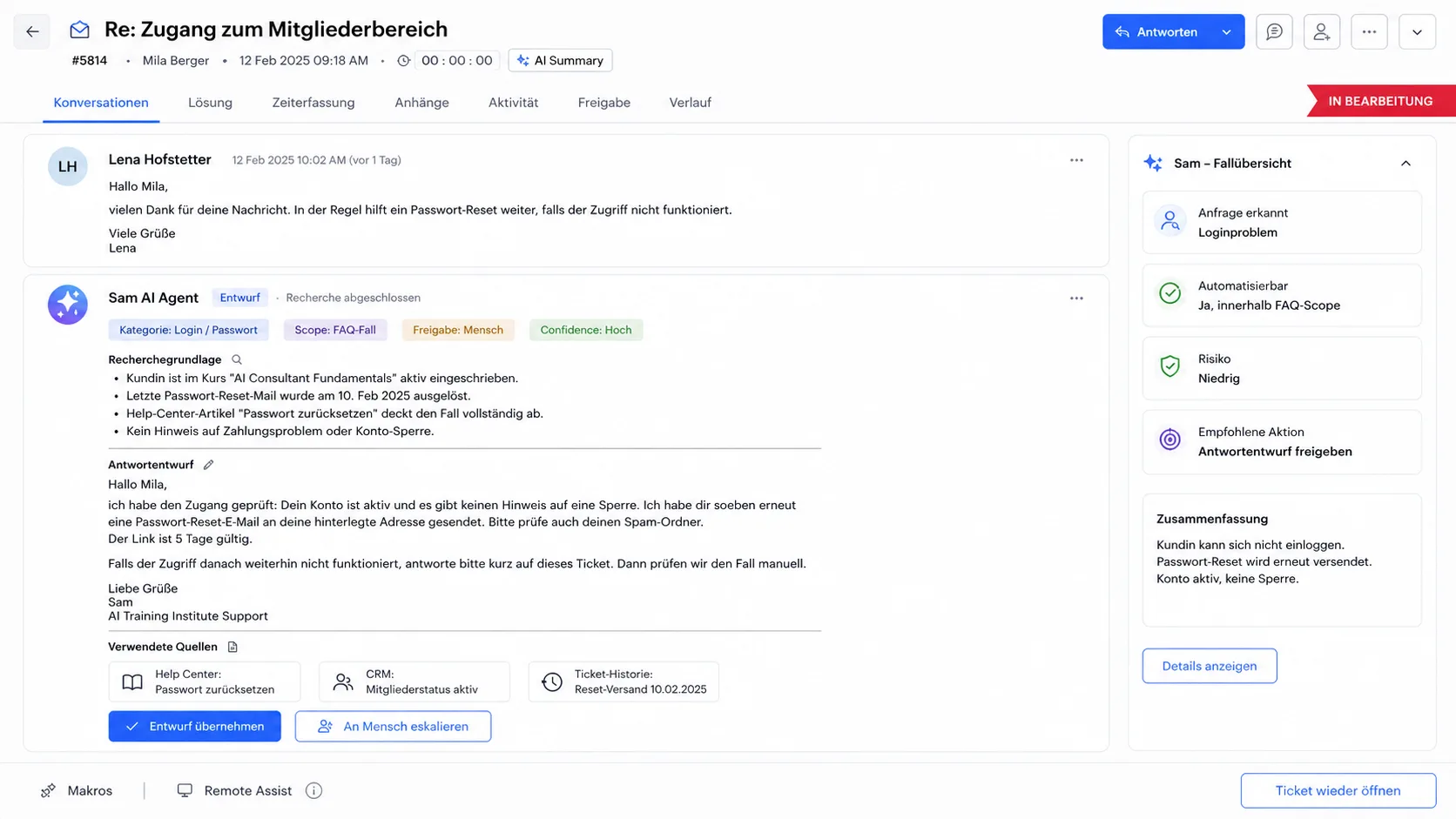
Automating customer service starts before the response.
A lot of time is lost before a response is written: searching for old tickets, checking customer data, reading internal rules, gathering context from multiple systems.
- 01
Read and classify tickets
- 02
Find appropriate context from knowledge sources and systems
- 03
Prepare draft answers
- 04
Automate FAQ cases within clear boundaries
- 05
Escalate unclear cases with context
- 06
Make research results visible to people
Not a chatbot that has to answer everything.
Chatbot responses are too limited
Many support projects start with the wrong expectation: the AI should immediately answer every request itself. This seems simple in a demo and quickly becomes risky in operation.
A digital support agent can first start as a research and draft system. If certain types of requests are stable, more will be automated. Everything else remains with humans.
Good automation has clear limits
When questions clearly recur, a digital support employee can take on more responsibility: identify FAQs, provide appropriate answers, and escalate anything outside the scope.
This works particularly well when knowledge sources are clean and the team has defined which answers may be automated.
Sam creates answer drafts with the research context.
Sam works in a ticketing system. It reads a request, looks for the required context across multiple systems, and creates a draft response. To do this, it provides the research result so that a human can check and send the answer.
- 01 ·Input
A ticket arrives in the support system.
Source and category are defined in the pipeline.
- 02 ·Reading
Sam reads the request and identifies what information is missing.
What is being asked, what is context, what is open?
- 03 ·Research
Sam looks for the right context in the relevant systems.
Knowledge base, CRM, contract and order data, old tickets.
- 04 ·Draft
Sam creates a draft answer based on research.
This makes it clear where the information comes from.
- 05 ·Approval
A human checks, adjusts and sends.
For FAQ cases, approval can be automated later.
Sam is not an autopilot in this setup. Above all, Sam takes the search work off the team.
Frequently asked questions.
Can AI automate customer service?
Yes, but not as an open autopilot. A good start is often a draft with research results. The team checks and sends the response. More automation comes later, once request type, knowledge source, and escalation rules are clear.
Which customer service requests are suitable for automation?
Recurring questions, clear FAQ cases, similarly structured inquiries, and tickets that require context from existing systems are well suited.
Can a ticket system be connected?
Many ticket systems can be connected if interfaces, data access, and rights are suitable. Current customer projects include Zendesk and Zoho Desk setups.
How are incorrect answers prevented?
Through limited tasks, verified knowledge sources, draft responses instead of autopilot, escalation rules, audit logs, and human approval for risk cases.
When does it escalate to people?
If the case is outside the defined scope, data is missing, the answer is uncertain, or a decision requires human responsibility.
What happens to customer data?
Customer data is not used to train third-party LLMs. The backend and deployed LLMs run in the EU. Specific data processing is documented for each setup.
Do you want to know whether your customer service can be automated in a controlled manner?
Talk about a support pilotYuno asks four short questions about request volume, knowledge sources, risk cases, and approval. After that, it is clearer whether a support pilot makes sense.